If you’ve ever found yourself juggling a phone charger, a wireless earbuds case, and a portable desk fan all while traveling or working from a coffee shop, you know how frustrating it is to carry multiple cords and bulky accessories. That’s where multifunction power banks come in—they’re the unsung heroes of modern convenience, and as a supplier of these all-in-one devices, I’ve helped hundreds of customers turn “power chaos” into streamlined, on-the-go functionality. But here’s the thing: a multifunction power bank isn’t just a bigger phone charger. To get the most out of its features (many of which are hidden if you don’t know what to look for), you need to use it strategically, safely, and in ways that align with how you actually use your devices. Today, I’m breaking down exactly how to maximize your multifunction power bank—with tips I’ve picked up from years of working with the people who rely on these devices every single day. Multifunction Power Bank

First, let’s start with the basics: what makes a multifunction power bank different from a regular one? A standard power bank only stores and delivers power via a single USB port, but a multifunction model includes extra features that eliminate the need for separate gadgets. At our company, our line of multifunction power banks, for example, integrates built-in interchangeable cables (USB-C, Lightning, and micro-USB, so you don’t lose cords), a built-in LED flashlight (with strobe and SOS modes), a wireless charging pad for earbuds or smartwatches, and even a small AC outlet for powering a laptop or tablet. But no two models are the same, so the first step is to map your needs to the features your power bank actually offers. If you’re a frequent business traveler who needs to power a 13-inch laptop and your iPhone, you’ll want a model with a 20,000 mAh capacity and an AC port rated for 65W or higher. If you’re a hiker who spends weekends off-grid, prioritize a model with a water-resistant casing and a long-lasting flashlight. Skipping this step leads to wasted money on features you’ll never use—trust me, I’ve seen customers buy a power bank with a wireless charging pad when they only need to charge their phone on the go.
Once you’ve got the right power bank for your lifestyle, the next rule is to use its built-in cables correctly—this is where most people make mistakes. Many multifunction power banks have retractable or integrated cables, but those cords are often thinner than the ones you’d buy separately, so cramming too many high-power devices into them can cause slow charging or even overheating. For example, if you plug a 15-inch MacBook Pro (which pulls about 60W) into a USB-C cable that’s only rated for 18W, you won’t just charge slowly—you could damage both the cable and your laptop’s battery over time. As a supplier, I always tell customers to check the wattage rating of their power bank’s ports before plugging in a device. Most multifunction models list their port output right on the device: a 20W port for phones, a 60W port for tablets and laptops, and a 5W port for smaller accessories like wireless earbuds. Stick to that rating, and you’ll extend the life of both your power bank and your devices.
Another underused feature of multifunction power banks is their wireless charging capability, which so many people treat as an afterthought. The wireless pad on the top of your power bank isn’t just for your phone—it’s perfect for smaller, lower-power devices like AirPods Pro, Samsung Galaxy Buds, or even an Apple Watch, which don’t draw a lot of power. Here’s a pro tip: place your wireless earbuds case directly on the center of the wireless charging pad (most power banks have a small icon or line marking the sweet spot) to ensure a solid connection. If you offload small devices to the wireless pad, you’ll preserve the higher-wattage ports for bigger items like your laptop, which means you’ll get two full charges for your phone instead of one. Just keep in mind that wireless charging is less efficient than wired, so if you’re in a hurry, always use a cable for larger devices.
Safety is non-negotiable when using any power bank, but it’s even more important with multifunction models, which have more parts that can malfunction if misused. The number one safety tip I give to all our customers is to never leave your power bank charging a device unattended for long periods—especially if it has an AC outlet. I’ve heard of a small number of cases where people left their power bank plugged into a wall overnight to charge their laptop, and the overheating AC port caused minor damage. Also, avoid charging your power bank in extreme temperatures: don’t leave it in a hot car during the summer, or in a freezer during the winter, because extreme heat can damage the battery and extreme cold can temporarily reduce its capacity. Finally, always use the charging cable that comes with your power bank, or a cable that’s rated for the same wattage as the port you’re using. Cheap, unbranded cables might work for your phone, but they can cause the power bank to overheat, which is a fire hazard.
Now, let’s talk about the features that make multifunction power banks truly worth the investment: the extra tools that turn a power shortage into a minor inconvenience instead of a crisis. For hikers and campers, the LED flashlight and SOS mode on a multifunction power bank are game-changers—most people don’t realize that these lights can last for up to 20 hours on a single charge, so you don’t need to carry a separate flashlight. When you’re in a remote area where cell service is spotty, the SOS mode (which flashes a specific pattern) can help search and rescue teams locate you if you’re in danger. For remote workers, the built-in AC outlet is a lifesaver when you’re working from a café that only has a few outlets—you can power your laptop, a Bluetooth speaker, and your all-in-one printer (if it’s a low-power model) all from the same power bank, so you don’t have to fight for wall space. Another often-overlooked feature: pass-through charging. Some multifunction power banks let you charge the power bank itself and power your devices at the same time, which is perfect if you’re on a long road trip and don’t have time to wait for the power bank to fully charge before using it.
Wait, but what about capacity? I get this question all the time from customers: “How much mAh do I really need in a multifunction power bank?” The answer depends on your device count and how often you’re away from an outlet. A 10,000 mAh model is great for day trips or work commutes—it can fully charge an iPhone 14 twice, or a Samsung Galaxy S23 once. A 20,000 mAh model is better for weekend trips or long flights, because it can charge a 15-inch laptop once, plus your phone and earbuds a couple of times. I always recommend buying a power bank with a little more capacity than you think you’ll need, because it’s better to have extra power than to run out mid-trip. Just make sure it’s within the airline’s carry-on limits—most commercial airlines allow power banks under 100 Wh (which is 27,000 mAh for most models) in carry-on bags, so avoid anything larger if you travel by plane frequently.
If you’ve already got a multifunction power bank, here’s how to maintain it so it lasts for 3 to 5 years (which is the average lifespan of a high-quality power bank). First, don’t fully drain it every time—lithium-ion batteries (the type used in all power banks) last longer if you keep their charge between 20% and 80%. So instead of waiting until your power bank dies to recharge it, plug it in when it hits 20%. Second, clean the ports regularly with a dry, soft brush to remove dust and lint—this is a common reason power banks stop charging devices, because lint can block the connection between the cable and the port. Finally, store it in a cool, dry place when you’re not using it—don’t leave it jumbled in your bag with keys or other sharp objects, which can scratch the casing and damage the internal components.
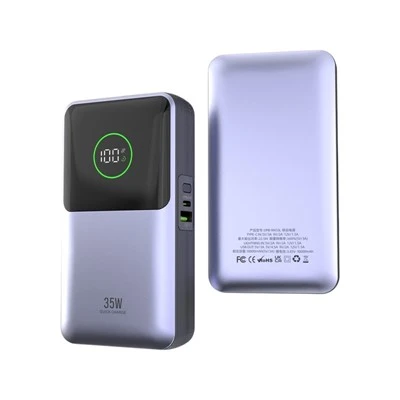
At the end of the day, a multifunction power bank is all about simplifying your life. It’s not just a backup charger—it’s a tool that lets you stay connected, productive, and safe, no matter where your day takes you. If you’re tired of carrying multiple cords, bulky chargers, and separate gadgets, a multifunction power bank is the solution you’ve been looking for. Our team has spent years designing these devices to meet real people’s needs, from frequent travelers to outdoor enthusiasts, and we’re here to help you find the right model for your lifestyle. If you’re ready to learn more or discuss bulk ordering for personal use, a small business, or an organization, don’t hesitate to reach out. We’re always happy to answer your questions and help you find a power bank that works for you.
Car Charger References
- Consumer Product Safety Commission. (2022). Portable Power Bank Safety Guidelines.
- International Electrotechnical Commission. (2021). Standard for Multifunction Portable Power Banks.
- Battery University. (2023). Lithium-Ion Battery Care and Longevity Tips.
- U.S. Department of Transportation. (2022). Carry-On Baggage Guidelines for Portable Power Banks.
KOMOS Co., Ltd.
As one of the most professional multifunction power bank manufacturers and suppliers in China, we are committed to providing high quality custom service and OEM service. Please feel free to wholesale bulk durable multifunction power bank at competitive price from our factory. Welcome to contact us for quotation.
Address: 4th Floor, Building 3, Zhongxi Buchong Community, Shajing Street, Bao’an District, Shenzhen City, Guangdong Province, China 518104
E-mail: contact@komos-tech.com
WebSite: https://www.komos-tech.com/
