If you’ve ever sat in a half-empty office or a cramped apartment, watching your Wi-Fi buffering mid-video call or dropping a game match, you’ve probably Googled a dozen quick fixes: reset the router, move it away from the microwave, update your phone’s OS. But what about the cables connecting your router to the wall, or the switch in your closet? As a data communication cable supplier, I get asked this question all the time: do those thick, boring cables hiding behind your wall actually impact Wi-Fi speed, or is that just another myth people spread to sell more cables? Data Communication Cable
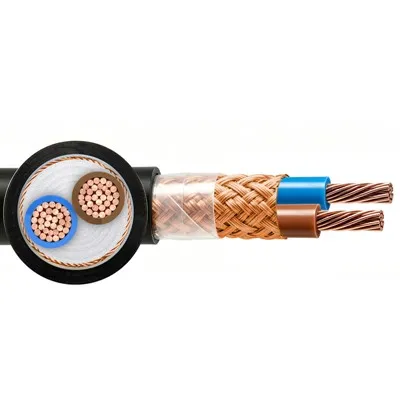
Let’s cut through the noise first—no stuffy engineering jargon, just what I see every day working with installers, small business owners, and even homeowners who call me panicking because their Wi-Fi is “broken” and they think it’s the router. The short answer is: it depends, but it’s way more than just “those cables don’t matter.” Let’s break this down like we’re chatting over a coffee, no textbooks required.
First, let’s remember what Wi-Fi actually is. It’s a wireless signal—radio waves, basically—transmitted from your router to devices like your phone, laptop, or smart TV. That signal lives in the 2.4 GHz and 5 GHz bands, bouncing off walls, furniture, and every random object in your space as it travels. Then there’s “wired” data: that’s the signal running through your data communication cables, usually Ethernet (Cat5e, Cat6, Cat6a are the ones most people deal with now) connecting your router to your modem, or your access points to the main network switch. A lot of people mix these two up, and that’s where the confusion starts.
Wait, so how do cables even touch Wi-Fi? Because if your wired connection (the one through your data comm cables) is slow or unstable, that’s going to slow down the Wi-Fi signal, too. Here’s why: your router isn’t a magic box that makes internet out of thin air. It’s the middleman. The modem pulls the internet from your service provider, sends that data through your data communication cable to the router, which then converts it into Wi-Fi radio waves to send to your devices. If that cable between modem and router is garbage—say, old Cat5 that’s damaged, or too thin for the data you’re using—your router can’t get all the data it needs fast enough. So even if your Wi-Fi signal is perfect across the house, your router is throttling the speed because it’s waiting on that cable. That’s the most common mistake people make: blaming Wi-Fi for a wired cable problem.
I had a small café client last year who swore their Wi-Fi was “terrible” during lunch rushes. Customers were complaining about slow downloads, video calls dropping, even the Wi-Fi-enabled POS machines cutting out. They’d upgraded their router three times, bought a new range extender, and still nothing. When I sent one of our installers to check the back closet, we found a 15-foot length of frayed, unshielded Cat5 cable running from the modem on the first floor to the router on the second. That old Cat5 couldn’t handle the 100 Mbps internet plan they’d signed up for—back in 2010, when that cable was installed. We swapped it for a 15-foot run of Cat6a, properly terminated with solid copper connectors, and their Wi-Fi speed jumped 40% overnight. They thought they needed a new router, but they just needed a better data comm cable. That’s not an isolated case, either.
Now, let’s talk about the other side: do cables actually interfere with Wi-Fi signals? This is the part where people get into debates about electromagnetic interference (EMI) and all that, and most of the time, the answer is “not usually, unless you cut corners on cable quality.” Wi-Fi is radio waves, and data comm cables (especially unshielded ones, like UTP) can pick up or emit EMI if they’re run next to big power lines, microwaves, or other wireless devices. But here’s the thing: cheap cables from no-name brands—you know, the ones sold at the dollar store, labeled “Ethernet Cable” but made with stranded copper instead of solid, or thin insulation that falls apart after a year—are way more likely to cause EMI issues than high-quality data communication cables.
Last quarter, a home user emailed me saying their Wi-Fi was slower when they ran a new cable from their router to their gaming PC. It turned out they’d bought a $5 Amazon cable that was actually a Cat5, not Cat5e, and they ran it next to a power strip along their baseboard. The cable was so thin that it was picking up interference from the power lines, which was messing with the Wi-Fi signal nearby. We sent them a 6-foot solid copper Cat6 cable, shielded (FTP) just in case, and they said the Wi-Fi interference went away entirely—plus their wired PC speed doubled. That’s the difference between a cheap cable and a proper data communication cable: we design our cables to handle EMI, to transmit data cleanly, so they don’t mess with other signals around them.
Wait, but what about Wi-Fi access points? A lot of offices now use multiple access points (APs) to cover big spaces, and those APs are connected to the main network via data comm cables, too. If your back-end cabling for APs is slow, your Wi-Fi will suffer in areas far from the main router. For example, a 5 GHz Wi-Fi signal is fast, but it doesn’t travel as far as 2.4 GHz. If your AP is only getting 10 Mbps through a bad cable, it can’t send that fast 5 GHz signal to your devices—even if the Wi-Fi itself is capable of 1 Gbps. That’s a big one for offices with open workspaces, or homeowners with multi-story houses. We do a lot of bulk cable installs for offices, and we always tell them: don’t skimp on the cabling for APs, because that’s the backbone of your Wi-Fi.
Let’s bust a few myths while we’re at it. First myth: “Any Ethernet cable works for Wi-Fi.” No—if you’re running a gigabit internet plan, a cheap Cat5 cable can only handle up to 100 Mbps. That means even if your Wi-Fi is supposed to be 500 Mbps, your cable is capping it at 100, so your Wi-Fi will never go faster than that. Second myth: “Longer cables always kill speed.” Not if they’re high-quality. A 50-foot run of Cat6a can handle up to 10 Gbps, same as a 10-foot run, as long as it’s installed properly (no kinks, solid copper, correct termination). Bad installation is way more of a problem than length, in most cases. Third myth: “Cables don’t affect 5 GHz Wi-Fi at all.” 5 GHz is more sensitive to interference, so a bad cable causing EMI will mess with 5 GHz way more than 2.4 GHz. That’s why a lot of people notice their Wi-Fi is slow on their 5 GHz band, but fine on 2.4 GHz—they have a bad data comm cable.
Now, let’s get to the part that matters to you: what does this mean for your Wi-Fi? If your Wi-Fi is slow, before you go buying a new router or a mesh Wi-Fi system, check your cables. First, test your wired connection: plug a laptop directly into the modem (skip the router) and run a speed test. If that speed is way slower than your plan, the problem is either your modem, or the cable between modem and router. If that speed is fine, then the router’s Wi-Fi setup is the issue. But if you’re running multiple APs, your cabling between APs and the main switch is a common culprit.
As a data communication cable supplier, we see this every day: most Wi-Fi “problems” trace back to cheap, old, or improperly installed cables. We had a school district reach out last year because their Wi-Fi was dropping during online classes. They had 200 APs, all connected with old Cat5 cables. We swapped all the runs to Cat6, and their Wi-Fi speed for students went up 60% without them having to touch a single router. That’s the power of good cabling.
But wait—let’s be real, not every cable is going to change your Wi-Fi. If you have a small apartment with a router right next to your modem, a 3-foot Cat5 cable is probably fine. But if you have a house over 2,000 square feet, a home office with multiple devices, or a small business with 10+ employees streaming or video calling, cutting corners on data communication cables is a mistake. It’s like trying to run a 10-person meeting in a closet: the space is too small, so people can’t do what they need to. Your cables are the space for your data—if they’re too flimsy, the data can’t move fast enough, even if your “meeting” (Wi-Fi signal) is perfect.
Another thing to consider: future-proofing. A lot of people buy the cheapest cable they can find, then a year later they upgrade their internet plan and realize their old cable can’t handle the faster speed. High-quality data communication cables (Cat6, Cat6a) are built to handle gigabit speeds now, and even 10 Gbps for the next 5-10 years. So even if you don’t notice a difference today, you will when you upgrade your internet. We get a lot of repeat customers who call us because they upgraded their internet and their old cable was holding them back—they wish they’d bought the better cable the first time.
Now, I’m not here to sell you a cable for no reason. If your Wi-Fi is working fine, if your speed tests are hitting your plan’s mark, and your cables are in good shape, you don’t need to swap them. But if you’re dealing with consistent slow Wi-Fi, buffering, or dropped connections during peak times, checking your data communication cables is the first step to fixing it, not your router or your Wi-Fi device.
Let’s wrap this up: do data communication cables affect Wi-Fi speed? They can, absolutely—but not in the way most people think. They don’t directly cause your Wi-Fi signal to drop (usually), but they’re the backbone that carries the data to your router to turn into Wi-Fi. A bad cable throttles that data, making your Wi-Fi slower no matter how good your wireless setup is. Cheap, poorly made cables can cause interference that messes with Wi-Fi signals, especially the faster 5 GHz band. And for multi-device spaces or bigger properties, properly installed, high-quality data comm cables are non-negotiable for consistent Wi-Fi speed.
If you’re tired of guessing why your Wi-Fi is acting up, or you’re planning a new office build, a home reno, or just want to future-proof your network, we can help. Our team works with installers, small businesses, and homeowners to pick the right data communication cables for your space—no overcharging, no one-size-fits-all nonsense. We test every cable we ship to make sure it meets our standards, so you don’t have to deal with the frayed, thin stuff that causes all those Wi-Fi headaches.
Reach out to our team to chat through your needs, get a quote, or even a quick consultation on what cables will work best for your setup. We don’t do pushy sales calls—we just know how frustrating it is to have slow Wi-Fi when you need it, and we’re here to make that stop.
Installation Cable References:
IEEE 802.11-2020, Wireless LAN Medium Access Control (MAC) and Physical Layer (PHY) Specifications
TIA-568-C.2, Commercial Building Telecommunications Cabling Standard – Part 2: Balanced Twisted-Pair Cabling Components
Federal Communications Commission (FCC), Electromagnetic Emissions from Digital Devices and Telecommunications Equipment
Yangzhou Huayu Cable Co., Ltd.
Yangzhou Huayu Cable Co., Ltd. is one of the most professional data communication cable manufacturers and suppliers in China, also supports customized service with low price. Please feel free to wholesale advanced data communication cable made in China here from our factory. Contact us for pricelist.
Address: No.9 Jingang Road, Yangzhou City, Jiangsu Province, China
E-mail: info@huayucabletech.com
WebSite: https://www.huayucabletech.com/
